Friday, 4 November 2011

LookUp vs Master - Detail relationship in SFDC

Master – Detail Relationship :
  1. We cannot create master – detail relationship type fields directly if records already exists.
  2. If we delete master records then detail (Child) records are deleted.
  3. The Owner field on the detail and subdetail records is not available and is automatically set to the owner of the master record. Custom objects on the “detail” side of a master-detail relationship can't have sharing rules, manual sharing, or queues, as these require the Owner field.
  4. You can define master-detail relationships between custom objects or between a custom object and a standard object. However, the standard object cannot be on the detail side of a relationship with a custom object. In addition, you cannot create a master-detail relationship in which the User or Lead objects are the master.
  5. The master-detail relationship field is required on the page layout of the detail record.
  6. Rollup Summary fields are only available on master-detail relationships, not lookups.
  7. One detail side record can have maximum 2 masters but no limit on the Lookup fields.
Look up relationship :
  1. Look up relationship creates relations between two objects.
  2. If we delete any object then other object is not deleted.

Thursday, 3 November 2011

How to create Web-To-Lead ?

1. To create a Web-to-Lead form, click Click Your Name | Setup | Customize | Leads | Web-to-Lead.

2. Select fields to include on your Web-to-Lead form.

3. Specify the complete URL to which users should be directed after they submit their information—for example, your company's home page for a thank you page—and click Generate.

4. Copy the generated HTML code and provide it to your company's webmaster to incorporate into your website.
    (or)  save the copied html code into your local drive eg. c:\salesforce\WebToLeadExample.html

5. Click Finished.

6. Double click the WebToLeadExample.html file saved in step 4 and enter the details and click "Submit"

7. Click the Leads tab in your Salesforce application and check the newly created web to lead details.

Sunday, 30 October 2011

Bulikfy Apex Code / Trigger


Bulkifying Apex code refers to the concept of making sure the code properly handles more than one record at a time.  If a batch of records (via the webservices call) invokes the same Apex code, all of those records need to be processed as a bulk, in order to write scalable code and avoid hitting governor limits.
eg.
trigger accountTestTrggr on Account (before insert, before update) {

   List<String> accountNames = new List<String>() {
 
   //Loop through all records in the Trigger.new collection
   for(Account a: Trigger.new){
      //Concatenate the Name and billingState into the Description field
      a.Description = a.Name + ':' + a.BillingState
   }
   
}

Dynamic Visualforce bindings

Dynamic Visualforce binding is useful to write generic Visualforce pages that display information about records without knowing which fields to show. In other words, fields on the page are determined at runtime, rather than compile time.

To create a new field set:


Navigate to the field set list of the appropriate object:
    • For standard objects, click Your Name | Setup | Customize, select the appropriate object from the Customize menu, and click Field Sets.
    • For custom objects, click Your Name | Setup | Create | Objects, and select one of the custom objects in the list. Then click New above the field sets related list.


eg.
<apex:page standardController="Contact">

    <apex:form >
        <apex:repeat value="{!$ObjectType.Contact.FieldSets.Demo_Field_Set}" var="f">
            <apex:InputText value="{!Contact[f]}" /><br/>
        </apex:repeat>
    </apex:form>
</apex:page>

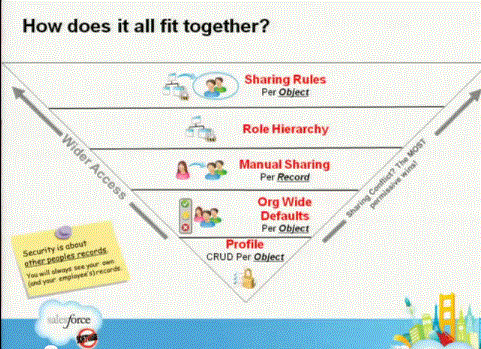
Salesforce Security

Security in Salesforce is defined at multiple levels and these levels are -
  1. Security at object level (Profile)
  2. Security at field level (Profile)
  3. Security at record level
    1. Organization-wide defaults
    2. Role-hierarchy
    3. Sharing rules
    4. Manual Sharing


Profile: Object & field level security can be setup via profile and CRUD permissions can be set for standard & custom objects.

OWD: Used to restrict the permission.,  

All profiles get at least the privileges defined in OWD. OWD takes three different values -
  1. Private (Cant view and edit)
  2. Public Read only (Can view)
  3. Public Read-Write (Can view and edit)
Manual Sharing:
Manual Sharing is used to grant one-off access. Manual sharing can be granted by record owner, any one above the owner in role hierarchy and System Administrator. Manual sharing is used to handle exception cases where access to a particular record needs to be given to a specific user. There is a Sharing button on the records page. This is used to provide manual sharing. 

Role Hierarchy:
Role Hierarchy allows additional users access to records.    If the role has access to some records, then it's parents and ancestors are able to access the record as well.

Sharing Rules:
Share between roles in diff. hierarchy branches.    Sharing rule is defined using public groups. Record that match certain condition can be assigned to users in public groups using Sharing Rules. Sharing rules functionality is available via the menu Sharing Settings.

How to compare date in Dynamic SOQL

First convert the date value into datetime value, because format method can't used with the Date Type.
Date orig = customPage.startDate;


DateTime dtConverted = Datetime.newInstance(orig.year(),orig.month(),orig.day(),0,0,0);
       
System.debug(' converted date ' + dtConverted.format('yyyy-MM-dd\'T\'h h:mm:ss\'Z\'');


String qry = 'Select id, name, CreatedDate from Account ' +
        'where createddate > ' +  dtConverted.format('yyyy-MM-dd\'T\'h h:mm:ss\'Z\'') + ' order by name ';


List<Account> searchResults = Database.query(qry);

Saturday, 29 October 2011

Find Day of the week in Salesforce

Any of the following date formats can be used to calculate the day of the week .


String shortDayOfweek = DateTime.now().format(‘EEE’); // ‘Sat’
String longDayOfweek = DateTime.now().format(‘EEEEE’); // ‘Saturday’